
Cold Follow-Ups
1. Overview
The Cold Follow-Ups module is used to manage and revisit queries where customers have not yet finalized their travel dates.
It helps agents track undecided customers and ensure timely follow-ups based on estimated travel timelines.
2. Access for Agents
| Feature | Access |
| View Own Cold Follow-Ups | Allowed |
| Send Query to Cold Follow-Up | Allowed |
| Track Follow-Up Reminders | Allowed |
| View Others’ Queries | Not Allowed |
3. What is a Cold Follow-Up
A Cold Follow-Up is created when:
- A customer is interested but has not finalized travel dates
- The agent wants to revisit the query at a later time
- The query needs to be temporarily paused without losing track
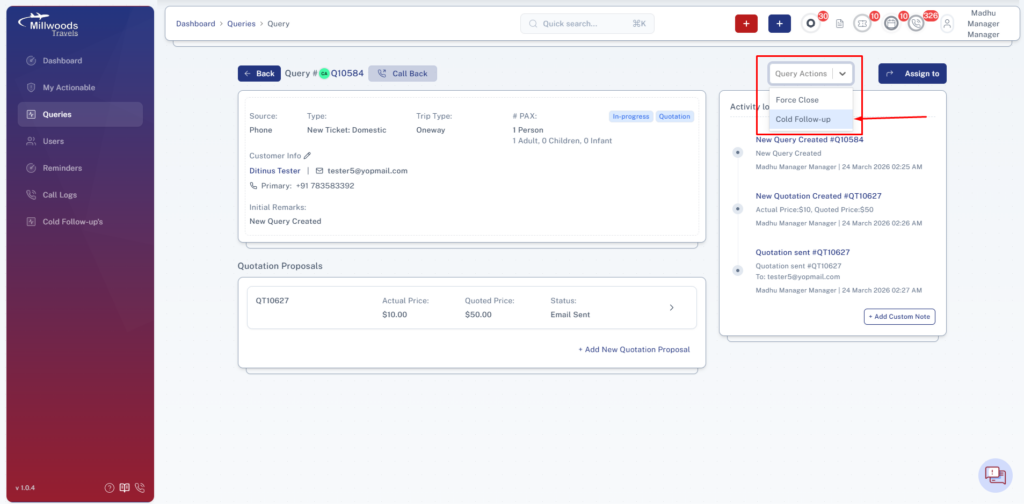
4. Sending a Query to Cold Follow-Up
Step-by-Step
- Open the Query Details Page
- Click on “Query Actions”
- Select “Send to Cold Follow-Up”
- Enter estimated travel date (if required)
- Submit
5. Viewing Cold Follow-Ups
Step-by-Step
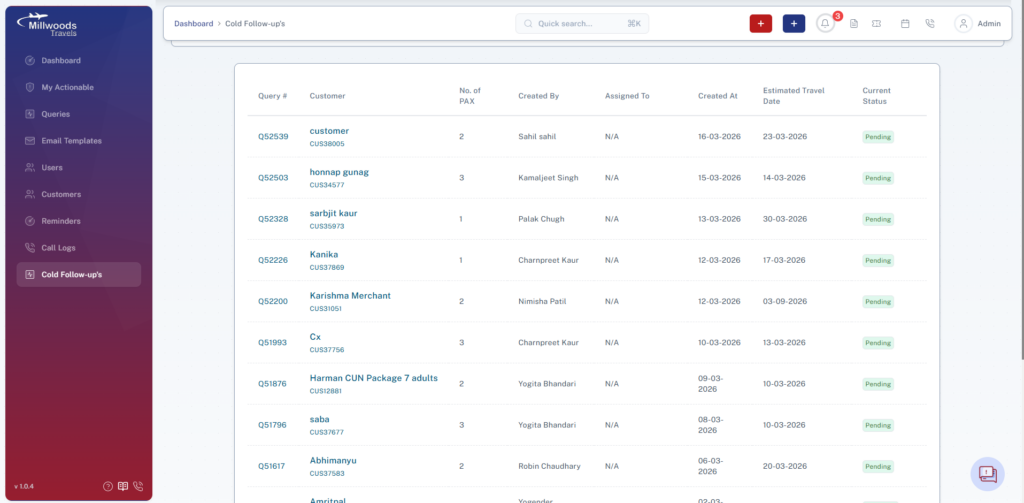
- Navigate to the Cold Follow-Ups module
- View list of all queries marked for cold follow-up
What You See
- Query details
- Customer information
- Estimated travel date
- Assigned agent
- Status indicator
Explanation
- Listing View: Displays all cold follow-up queries
- Estimated Date: Indicates when follow-up is expected
- Assigned User: Shows who created the follow-up
6. Reminder for Cold Follow-Ups
- A reminder is automatically triggered based on the estimated travel date
- The reminder indicates:
- Which agent or manager created the follow-up
- Which query needs attention
7. Taking Action on Cold Follow-Up
When reminder is received:
- Open the query
- Contact the customer
- Update query:
- Convert to active follow-up
- Create quotation
- Close if not interested
Daily Usage
- Review cold follow-ups daily
- Act on reminders promptly
- Convert interested customers into active queries
- Close inactive queries when necessary
Important Notes
- Cold follow-ups should not be ignored
- Estimated travel date is critical for proper tracking
- Timely action improves conversion chances