
Billing Queue
5.1 Overview
The Billing Queue is used by agents to send finalized queries for payment processing to managers.
- Agents do not process payments
- Agents initiate the billing workflow
5.2 What You Can Do
- Send Query to Billing Queue → Move a completed query for payment
- Attach Billing Documents → Upload invoices or supporting files
- Trigger Payment Process → Notify managers that billing is required
5.3 How to Send a Query to Billing Queue
Step-by-Step
- Open the Query Details Page
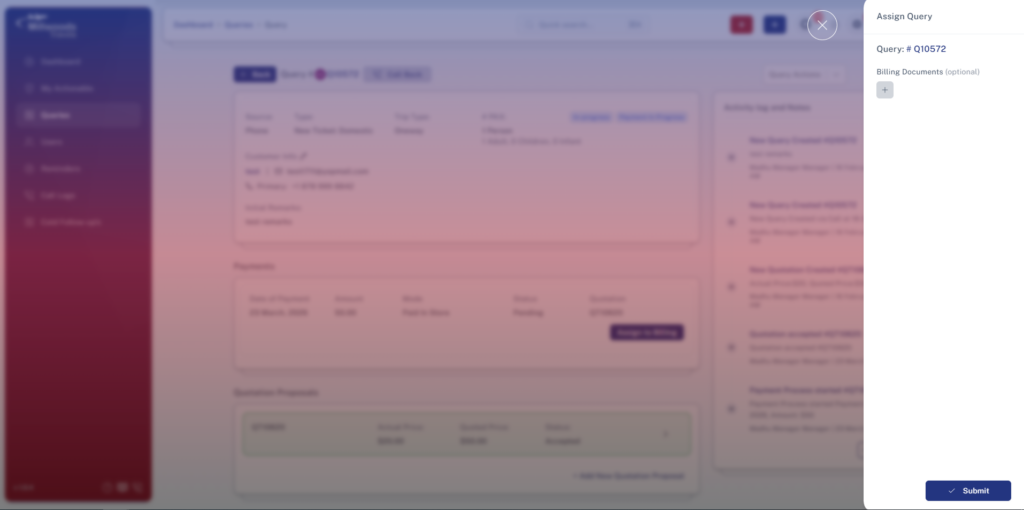
- Click on “Send to Billing” / “Assign Query”
- A side panel will open
- Upload billing documents (optional)
- Click Submit
5.4 One-Line Field Explanation
- Billing Documents (Optional) → Upload files required for billing verification
- Submit Button → Sends the query to the Billing Queue
5.5 Daily Usage
- Send only confirmed and finalized queries
- Ensure all booking details are accurate before sending
- Upload documents if needed to avoid delays in billing
5.6 Important Notes
- You cannot see or track the Billing Queue
- Once sent, the query is handled by managers
- Incomplete details may delay payment processing